
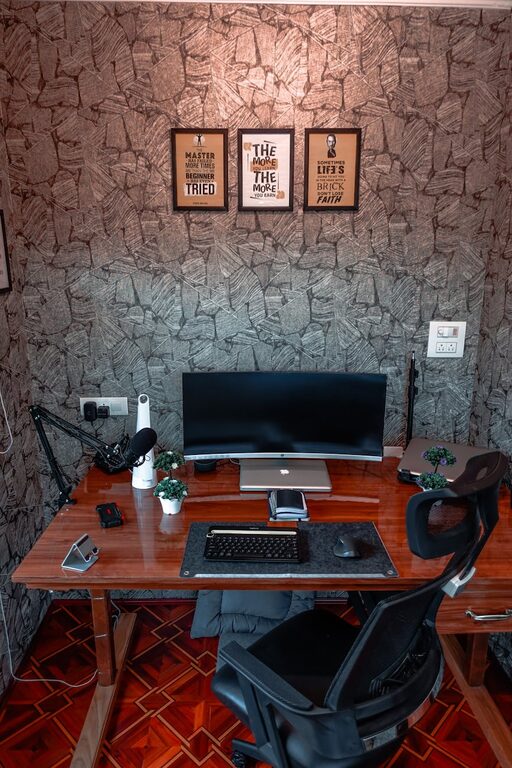
Creating a cozy and functional home workspace is essential for anyone who works or studies from home. A thoughtfully designed area not only boosts productivity but also provides comfort and inspiration throughout the day. Whether you have a dedicated room or a small corner, these tips will help you transform your space into a place you enjoy spending time in.
Assess Your Space and Needs
Before diving into decorating or buying furniture, take a moment to evaluate your available space and your work requirements. Consider the following:
– How much room do you have? A full room or a shared area?
– What equipment do you need daily? Laptop, multiple monitors, printer, etc.
– Do you require storage for documents, supplies, or books?
– How long will you typically spend working in this space each day?
Answering these questions will guide your choices and help you prioritize functionality and comfort.
Choose the Right Desk and Chair
Desk Selection
Your desk is the centerpiece of your workspace. Opt for a desk that fits your work style and space:
– Size: Ensure it’s large enough to hold your computer, accessories, and a little extra for note-taking.
– Shape: Rectangular desks are classic, but corner or L-shaped desks work well in tight or shared spaces.
– Adjustability: Consider height-adjustable desks that allow you to switch between sitting and standing.
Chair Comfort
Invest in an ergonomic chair that supports good posture:
– Look for adjustable height and backrest.
– Choose a chair with lumbar support to reduce back strain.
– Ensure the seat is cushioned but firm.
Comfortable seating is crucial to avoid fatigue and discomfort during long working hours.
Optimize Lighting
Good lighting reduces eye strain and helps maintain focus.
– Natural light: Position your desk near a window if possible to take advantage of daylight.
– Task lighting: Use a desk lamp with adjustable brightness to illuminate your workspace precisely.
– Avoid glare: Place screens perpendicular to windows, if possible, to reduce glare.
Soft, warm lighting is often more relaxing and contributes to a cozy atmosphere.
Declutter and Organize
A tidy workspace helps maintain concentration and productivity.
– Use organizers, trays, or drawer dividers to keep small items in place.
– Incorporate shelves or filing cabinets for papers and books.
– Keep only regularly used items on the desktop.
– Cable management solutions, like clips or sleeves, can keep cords neat.
Investing time in organization pays off with a distraction-free area.
Personalize Your Workspace
Adding personal touches makes your workspace inviting and helps create a positive mood.
– Hang artwork or photos that inspire or relax you.
– Include a small plant or two; greenery can improve air quality and reduce stress.
– Choose a few favorite desk accessories but avoid overcrowding.
Balancing personalization with simplicity keeps the space cozy without feeling cluttered.
Manage Noise and Distractions
Minimize disruptions to stay focused.
– Use noise-canceling headphones if ambient noise is an issue.
– Consider a white noise machine or soft background music to mask distractions.
– Establish boundaries with household members during work time.
A quiet environment helps maintain productivity and calm.
Incorporate Comfort Features
Comfort leads to better work performance and overall well-being.
– Use a soft rug underfoot for warmth and texture.
– Keep a cozy throw blanket nearby for chilly days.
– Maintain easy access to water or a favorite beverage to stay hydrated.
These small touches can make your workspace feel more welcoming.
Keep Technology Up-to-Date and Accessible
Ensure your tech setup supports your work efficiently.
– Invest in a reliable computer and fast internet connection.
– Use wireless accessories to reduce cable clutter.
– Consider a second monitor if your work involves multitasking.
Regularly updating hardware and software can improve your workflow significantly.
Maintain Good Air Quality
Fresh air boosts concentration and comfort.
– Open windows regularly to ventilate the space.
– Use an air purifier if needed to reduce dust or allergens.
– Place plants that help purify the air, such as spider plants or peace lilies.
Healthy air contributes to a more enjoyable and productive workday.
Establish a Routine and Keep the Space Dedicated
Lastly, treat your home workspace as a separate zone.
– Try to use the same area daily to build habits.
– End each day by tidying the desk to signal work time is over.
– If space is limited, use a privacy screen or foldable partitions to visually separate your workspace.
Having clear boundaries supports work-life balance and mental focus.
—
By applying these tips, you can create a cozy, organized, and functional home workspace tailored to your needs. Investing time in setting up the right environment helps increase productivity and makes remote work or study more enjoyable. Happy decorating!